
Discord scheduler for server announcements
Schedule messages to your Discord server and let Ravenpost post them on time, with images and videos attached and the same announcement cross-posted to every other network you publish to.
See it the way Discord will
The composer previews every destination as that platform renders it — media cropped the way it will crop, the caption truncated where it will truncate. What you see here is the composer’s own preview component, not a mock-up of one.

Ravenpost
channel
New: schedule your server announcements from Ravenpost. Write it once, pick the channel, and it goes out on time here and on every other network you post to. Flat pricing, and unlimited posts on every paid plan. https://ravenpo.st
One of our own posts, in Discord’s preview.
Scheduling Discord, specifically
A webhook or the bot, your choice
Paste a channel’s webhook URL to connect that one channel, with no app to install and no permission to approve. Or add the Ravenpost bot to your server: it connects the whole server as one account, and you pick the channel each time you write a post.
Discord’s own formatting and attachments
Captions keep Discord markdown (bold, italics, underline, strikethrough, code and quotes) and links unfurl as they always do. Up to ten images or videos ride along on one message.
Threads in order, and a way back
A thread goes out as consecutive messages in the channel, up to 25 follow-ups, so a long announcement reads in order. And a message Ravenpost posted can be deleted from Ravenpost, in Discord too.
What Discord allows
Straight from the app’s platform registry — the same limits the composer enforces.
- Caption limit
- 2,000 characters
- Images per post
- 10
- Videos per post
- 10
- Text-only posts
- Yes
- Threads
- Up to 25 follow-ups
- Analytics
- Not available
- Delete from Ravenpost
- Yes
Worth knowing first
There are no Discord analytics: a webhook can only write, and the bot is not given permission to read message history, so reactions, replies and views are never read back. And uploads are held to your server’s own file size limit.
Media guidance
Text, or up to 10 images/videos attached to one message.
 Instagram
 TikTok
 X
 Telegram
 LinkedIn
 Threads
 Bluesky
 Mastodon
 YouTube
 Pinterest
 DEV
 Hashnode
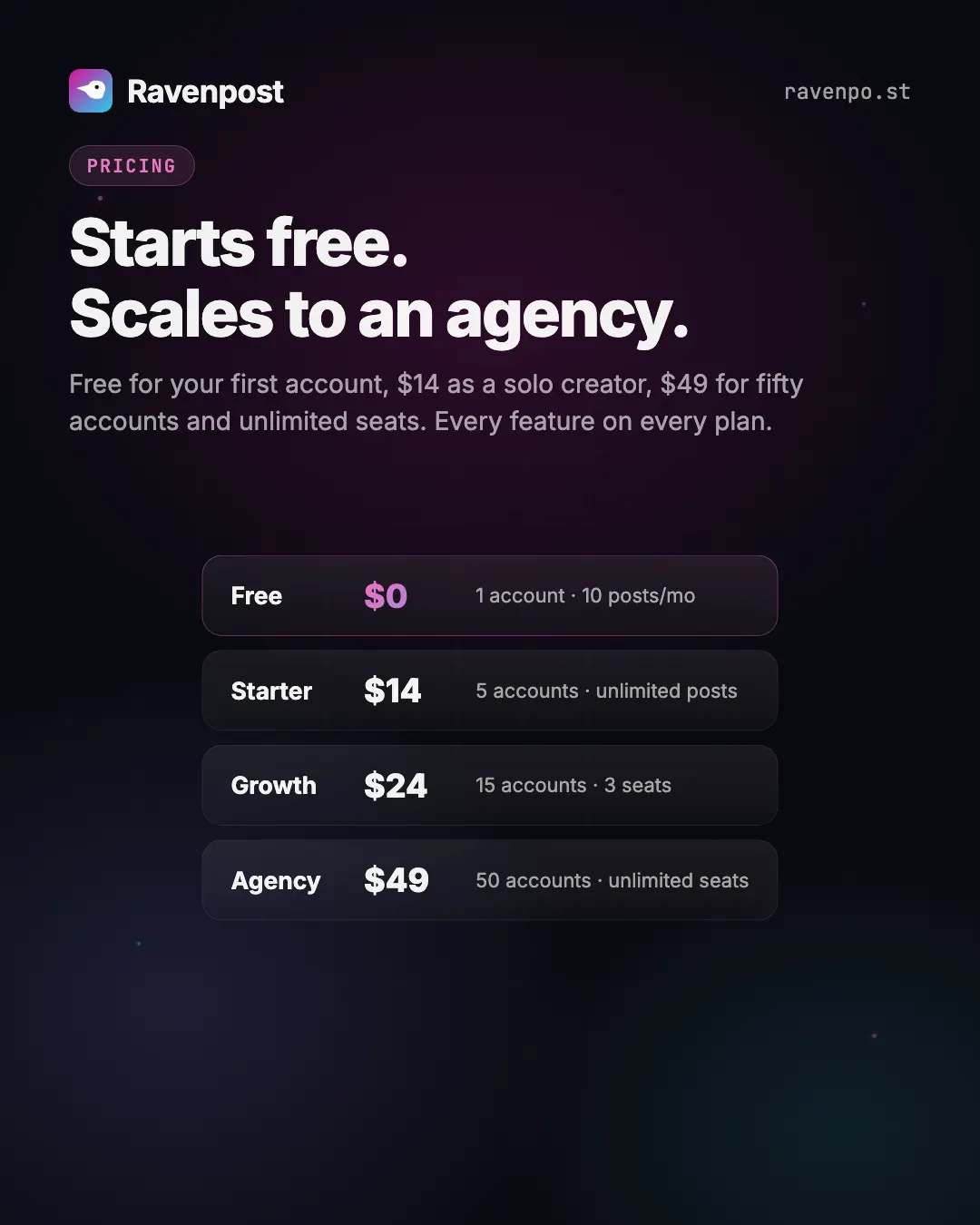
Starts free. Scales to an agency.
Free for your first account, $14/mo as a solo creator, $49/mo for 50 accounts and unlimited seats. Every feature on every plan; bigger plans add capacity and the larger AI models. Cancel anytime.
Free
Run your main account on it, for as long as you like.
Free forever
- 1 social account
- 10 posts / month
- Every platform we support
- Calendar, posting queue & media library
- Analytics for Instagram, Bluesky & Pinterest
- Built-in AI agent with brand memory, images & videos
- MCP server for Claude & other AI assistants
- AI: Claude Haiku & GPT-6 Luna
- 50 AI credits / month
- Agent routines as often as every hour
- 1 seat
- Email campaigns: try them with test sends
1 seat
Starter
3-day free trialFor solo creators getting consistent.
vs Postiz $29/mo
- 5 social accounts
- Unlimited posts (X: 200 credits / month)
- Everything in Free
- AI: up to Claude Sonnet & GPT-6.2 Sol
- 500 AI credits / month
- Agent routines as often as every 15 minutes
- 1 seat
- Email campaigns: 1,000 emails / month
- DM automation: 10,000 messages / month
Free for 3 days, then $14/mo.
Growth
For influencers and small teams running several accounts.
vs Postiz $49/mo
- 15 social accounts
- Unlimited posts (X: 350 credits / month)
- Everything in Starter
- Email support
- AI: up to Claude Opus & GPT-6.2 Sol
- 1,000 AI credits / month
- Agent routines as often as every 5 minutes
- 3 team seats
- Email campaigns: 2,500 emails / month
- DM automation: 50,000 messages / month
3 seats
Max
For agencies and social media managers running client accounts.
vs Postiz $99/mo
- 50 social accounts
- Unlimited posts (X: 700 credits / month)
- Everything in Growth
- Priority support
- AI: up to Claude Fable & GPT-6.2 Astra
- 2,500 AI credits / month
- Agent routines as often as every minute
- Unlimited team seats
- Email campaigns: 5,000 emails / month
- DM automation: 250,000 messages / month
Unlimited seats
Discord scheduling questions
How do I connect Discord?
Two ways. For one channel, open it in Discord, go to Edit Channel, Integrations, Webhooks, create a webhook and paste its URL on the Accounts page. For a whole server, choose Add to Discord and approve the Ravenpost bot; you then pick the channel on each post.
Can one post go to several Discord channels?
Yes. Connect each channel’s webhook as its own account and select as many as you like, alongside your other networks. A server connected with the bot posts to the one channel you pick for it.
How long can a Discord message be?
Discord allows 2,000 characters per message. If you select X alongside Discord, the composer limits you to X’s 280, unless you give Discord its own caption, which you can do on any post.
Can I delete a Discord message from Ravenpost?
Yes. A webhook and the bot can each delete the messages they posted, so the delete dialog offers to remove the message from Discord as well as from Ravenpost.
Schedule your first Discord post today
One connected account and ten posts a month, free forever. No card.
Start free